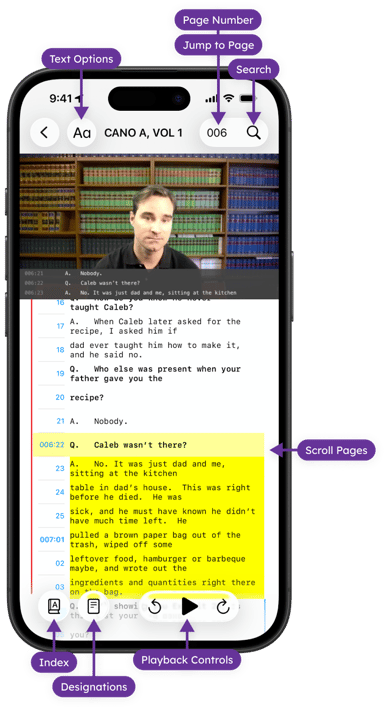
The controls below provide quick access to navigation, playback, designation, and reporting features while working with transcripts.
Navigation and Viewing Tools
-
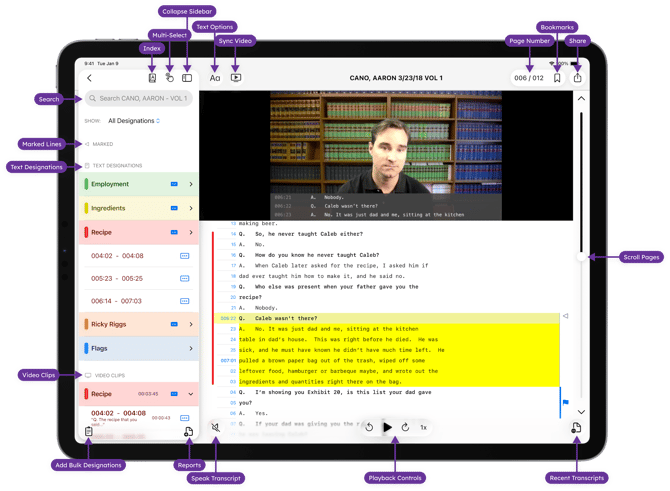
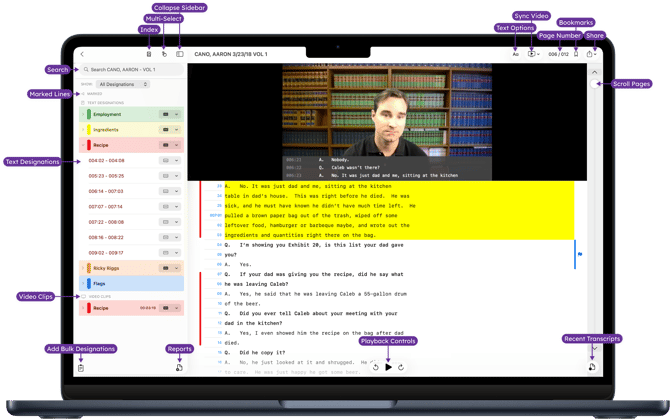
Page Number - See the page you are currently viewing, or tap to Jump to a Page.
-
Scroll Pages - Drag the scroll bar to scroll to a specific page and line in your transcript, or swipe up and down with your finger or stylus to go to the next page.
-
Recent Transcripts - Quickly switch between recently viewed transcripts
-
Auto-scroll Transcript - Hands free transcript review or control the scrolling speed for comfortable reading. (Using Auto Scroll in TranscriptPad)
-
Text Options - Adjust the font and font size of the transcript. (Transcript Display Settings)
-
Bookmarks - Add a bookmark to a transcript while reading. (Bookmark Key Sections in a Transcript)
-
Marked Lines - Capture and sync key passages of testimony across iPhone, iPad, Mac, and CarPlay for annotation and follow-up review. (Mark Lines for Review)
Annotation and Designation Tools
-
Text Designations - Tap blue page lines numbers to select text to annotate (Annotating Transcripts in TranscriptPad) or issue code (Creating Designations in TranscriptPad)
-
Add Bulk Designations - Create Multiple Designations from Pasted or Imported Page and Line Ranges (Add Designations in Bulk)
-
Video Clips - Create video clips from synced deposition video to capture key testimony (Creating Video Clips)
Playback and Listening Tools
-
Link and Sync Video - After importing a transcript, link and sync a video (Syncing Video with a Transcript)
-
Speak Transcript - Text-only transcripts can be read out loud to you using Apple’e Premium and Enhanced Voices. (Listen to Transcripts with Speak Transcript)
-
Turn on Speak Transcript and control the speed of the audio.
-
Control the speed of video playback in transcripts with synced video.
-
Organization and Export Tools
Multi-Select - Tap Multi-Select to select multiple items in the list you are viewing.
Reports - Export designations, annotations, and issue codes for review, presentation, or editing in third-party tools (Create and View Available Reports)
Share - Share the original .txt transcript or an Annotated Transcript. (Share Annotated Transcripts in TranscriptPad)
iPad
Mac
iPhone