Connect your iPhone to CarPlay to access your cases and start reviewing deposition transcripts hands-free.
Listening to a Transcript
When you connect your iPhone to CarPlay, TranscriptPad displays the Case Files and transcripts that are saved to your iPhone, or accessible in your iCloud storage. The TranscriptPad for CarPlay interface is designed for safe, one-tap interactions while driving.
Start Playback from the CarPlay Display
You can start playback directly from the CarPlay display.
- Open TranscriptPad from the CarPlay dashboard.
- Browse your Recent Transcripts or Case Files.
- Tap a transcript to begin playback.
Start Playback from Your iPhone
You can also start transcript playback from your iPhone, which will automatically begin playing through CarPlay.
How to Listen to a Transcript with Video
If your deposition video is synced to your transcript in TranscriptPad, audio plays through your car speakers and thumbnails of the video are displayed.
- Open a transcript with synced video.
- Tap the Play button to begin playback.
How to Listen to a Text-Only Transcript
If your transcript is text-only, use the Speak Transcript feature to read your transcript aloud using Apple's built-in voices.
- Open a text-only transcript on your iPhone.
- Tap Speak Transcript.
- Select a voice for questions and a different voice for answers.
Navigating the Transcript
While listening to a transcript in CarPlay, you can quickly move between sections of testimony and adjust the listening speed.
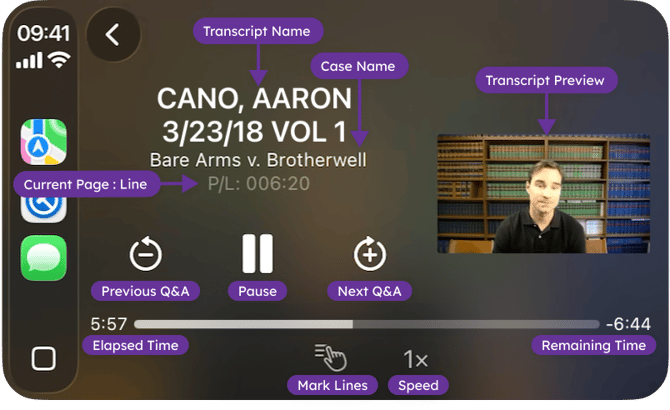
Tap the Next Q&A button (circular arrow with +) to jump to the next question in the transcript.
Tap the Previous Q&A button (circular arrow with −) to return to the previous question in the transcript.
You can adjust the listening speed using the Speed control below the progress bar. Tap the speed indicator to cycle through the available speeds: 1.00×, 1.25×, 1.50×, 2.00×, and 0.5×. This allows you to listen to testimony faster or slower depending on your preference.
Review while Driving with Marked Lines
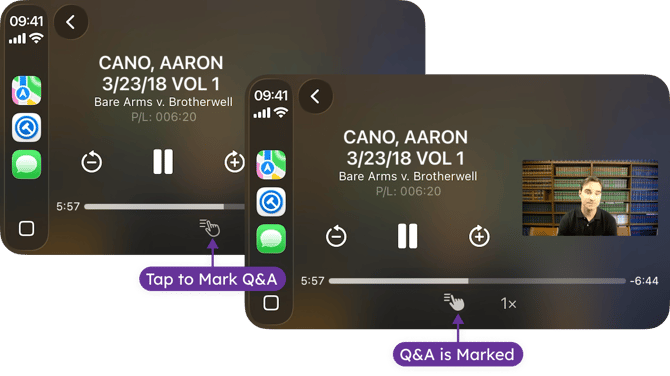
Marked Lines lets you save key testimony with a single tap on the CarPlay display. Tap the Marked Lines button while your transcript is playing, to mark the question and answer you are listening to for later review. Tap again to undo.
For more information about Marked Lines, please review Mark Lines for Review in our Help Center.