
DocReviewPad allows you to customize how Bates numbers appear before applying them to documents.
Bates Stamp Options
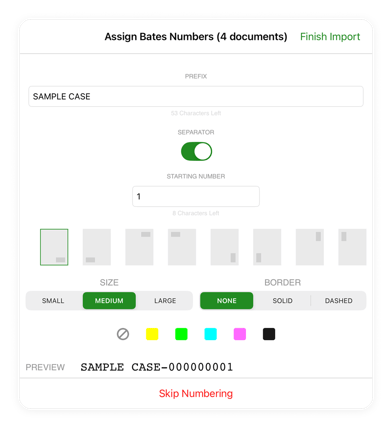
DocReviewPad offers flexible Bates stamp settings that apply to the documents or pages currently selected:
-
Prefix: Up to 64 characters
-
Separator: Option to add a dash (-) between prefix and number
-
Starting Number: Supports up to 9 figures
-
Location: Choose the corner and direction
-
Size: Three size variations
-
Border: None, solid, or dashed
-
Background: None or custom background color
A preview is shown before applying the stamp so you can confirm the appearance.
Why Bates Numbers Include Leading Zeros
DocReviewPad uses a monospaced font, meaning each character occupies the same width.
Leading zeros maintain consistent alignment as numbers increase. This makes it easier to flip through pages and visually locate a specific number.