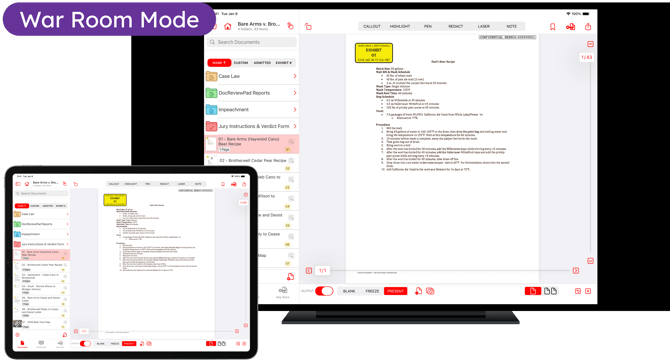
War Room Mode allows you to share the full TrialPad for iPad interface with colleagues or clients. In this mode, the output screen mirrors the TrialPad interface, including menus, case files, and annotation tools.
Use this setting for strategy sessions, client meetings, training sessions, or team preparation when everyone needs to see how evidence is organized and how it will appear during trial.
This is not a feature of TrialPad for Mac as the TrialPad screen can always be selected to share.
How to Activate War Room Mode in TrialPad
The iPad needs to be connected to an external display (screen, projector, monitor, or remote sharing platform) for War Room Mode to be activated.
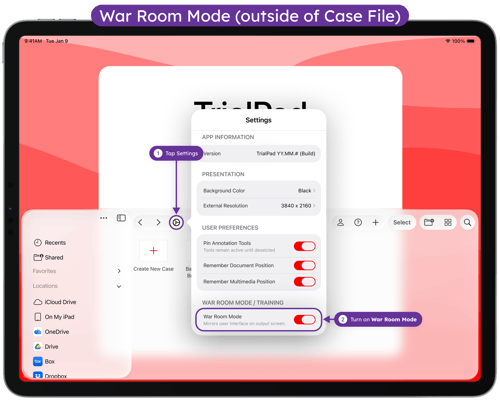
Outside of a Case File:
1. Tap Settings
2. Turn on War Room Mode
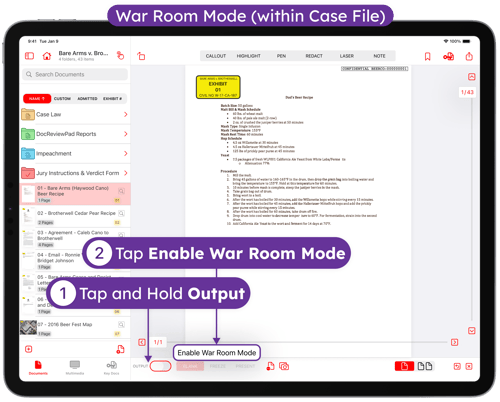
From within a Case File:
- Tap and hold on the Output switch
-
Tap Enable War Room Mode